
Chuyển đến nội dung chính
Global shell xuất hiện xuyên suốt workspace Vero OMS. Khu vực này chứa shortcut điều hướng, context tài khoản, command entry, settings, locale controls, trạng thái kết nối và layout controls.

Top navigation và command bar

Thanh trên cùng chứa logo, phím tắt F1 đến F8, Help, Settings, Fullscreen, display controls, language, clock/time zone, command prompt, New Order và context hiện hành. Global top navigation
ControlChức năng
F1 đến F8Chuyển nhanh giữa Dashboard, Orders, Portfolios, Algo, Put Through, Price Board, Operation và System.
CMD>Ô command/search để tìm account hoặc group.
NEW ORDERMở drawer đặt lệnh mà không rời workspace hiện tại.
HelpMở tài liệu hỗ trợ bên ngoài.
SettingsMở panel cấu hình terminal.
Fullscreen/displayĐiều chỉnh cách trình bày màn hình.
LanguageChọn EN hoặc VI.
Time zoneChọn múi giờ hiển thị cho clock và timestamps.

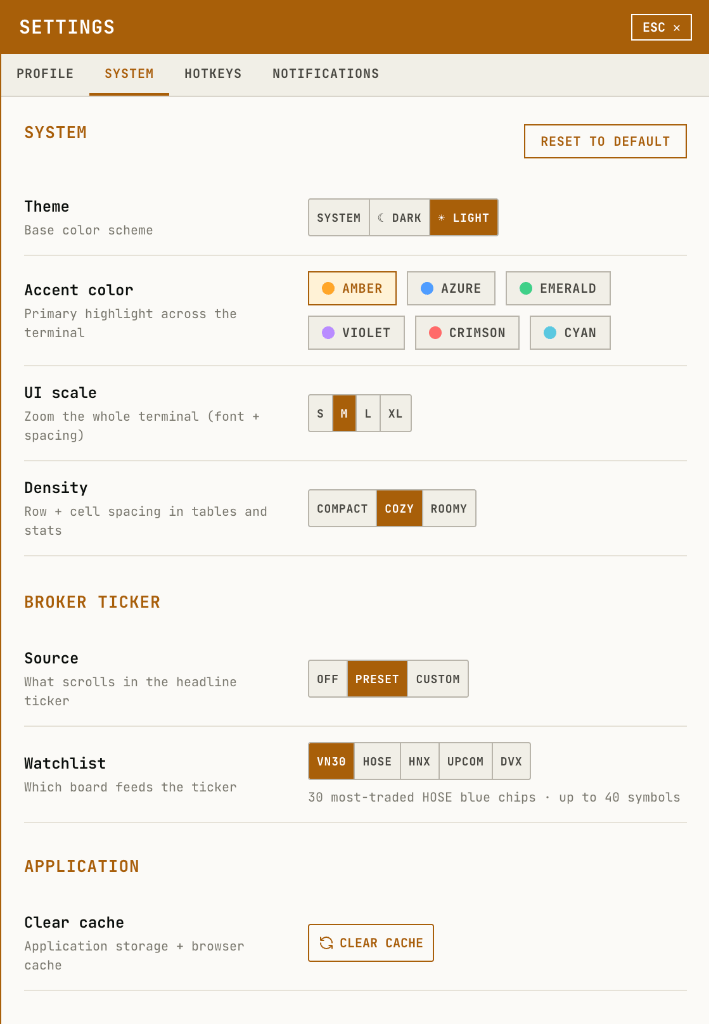
Settings

Settings có các tab Profile, System, Hotkeys, Notifications. Tab System chứa theme, accent color, UI scale, density, broker ticker source và clear cache. Settings system panel

Language menu

Menu language điều khiển ngôn ngữ giao diện. Language menu

Time zone menu

Menu time zone có search và danh sách múi giờ hỗ trợ cho clock và timestamps của terminal. Time zone menu

Algo menu

F4 Algo mở menu điều hướng algo. Menu gồm Execution Algo, MM Algo, Basket Trade, Neutral Algo, Strategy Algo và Options Strategy. Algo menu

Status bar

Status bar cuối màn hình hiển thị streaming connection, RTT/P99, market ticker, session timer, build version và layout controls. Global status bar

Layout controls

Toolbar layout ở góc phải dưới gồm layout selector, share layout, import layout và arrange/grid controls. Layout toolbar Layout menu hiển thị layout hiện tại, danh sách layout có sẵn, tạo layout mới và duplicate layout. Layout menu